ClinicFrame
ClinicFrame Scribe: The HIPAA-Compliant AI Virtual Medical Scribe for Real-Time Clinical Documentation
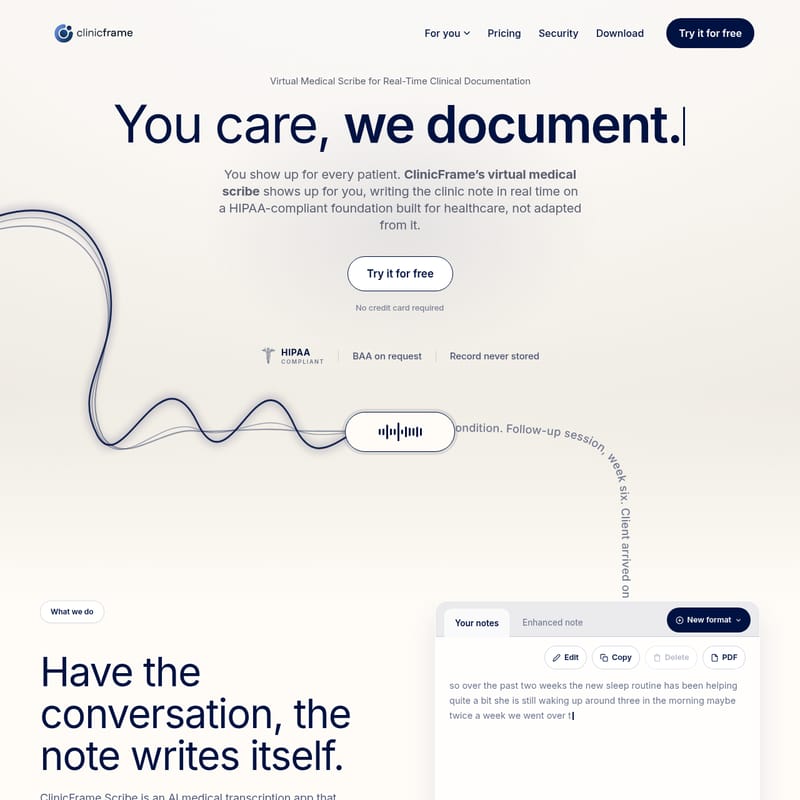
ClinicFrame Scribe is a powerful AI medical transcription app that automates clinical note-taking in real time. Designed for healthcare professionals, this virtual medical scribe offers 96% accuracy across 15+ specialties, including Psychiatry and Family Medicine. It supports SOAP, DAP, and BIRP templates, ensuring EHR-ready notes in seconds. With ambient capture for in-person visits and seamless telehealth integration without intrusive bots, ClinicFrame Scribe prioritizes patient care and data security. The platform is fully HIPAA-compliant, providing a Business Associate Agreement (BAA) upon request and ensuring audio recordings are never stored, allowing clinicians to focus on their patients while the AI handles the documentation.
2026-07-31
5.0K
ClinicFrame Product Information
ClinicFrame Scribe: The Future of Real-Time Clinical Documentation
In the modern healthcare landscape, clinicians often find themselves buried under a mountain of paperwork. The mantra "You care, we document" represents a significant shift in how healthcare providers manage their workflows. ClinicFrame Scribe is a cutting-edge virtual medical scribe and AI medical transcription app designed to transform patient conversations into complete, accurate clinical notes in real time. Built on a foundation specifically for healthcare, this tool ensures that you can show up for every patient while the technology shows up for you.
What is ClinicFrame Scribe?
ClinicFrame Scribe is a sophisticated AI medical transcription app that functions as a virtual medical scribe, capturing the nuances of patient-provider interactions and converting them into structured medical records. Unlike generic transcription tools, ClinicFrame Scribe is built specifically for clinical environments. It offers an impressive 96% transcription accuracy across more than 15 medical specialties, including Pediatrics, Cardiology, Family Medicine, and Psychiatry.
By utilizing ambient capture technology, the scribe listens to the conversation, identifies different speakers, and generates notes in formats such as SOAP, DAP, and BIRP. This allows clinicians to maintain eye contact and focus on the patient rather than a computer screen, knowing that their clinical documentation is being handled with precision.
Key Features of ClinicFrame Scribe
1. Real-Time Ambient Capture
Whether you are conducting an in-person visit or a telehealth session, ClinicFrame Scribe operates seamlessly. For in-person encounters, it uses ambient capture to listen and label speakers without requiring manual dictation. For telehealth, it captures call audio directly from your computer without the need for an intrusive bot to join the meeting.
2. High-Accuracy AI Transcription
With a 96% accuracy rate, the AI handles complex medical terminology across various specialties. This ensures that the generated notes are professional, accurate, and require minimal editing before being finalized.
3. Comprehensive Note Templates
ClinicFrame Scribe supports a variety of clinical structures to fit your specific workflow:
- SOAP Notes (Subjective, Objective, Assessment, and Plan)
- DAP Notes (Data, Assessment, and Plan)
- BIRP Notes (Behavior, Intervention, Response, and Plan)
- Custom Templates tailored to your unique practice needs.
4. EHR-Ready Integration
Efficiency is at the core of the platform. Once a session ends, you can copy the generated note into your Electronic Health Record (EHR) system in under 30 seconds. You can also export notes as PDFs for external sharing or physical records.
5. The Quick Bar and Desktop Integration
ClinicFrame Scribe is built as a dedicated desktop app for macOS and Windows. This allows it to run in the background rather than being lost in a browser tab. The Quick Bar floats over any window, giving you one-click access to patient context, notes, and AI assistance without disrupting your screen layout.
How to Use ClinicFrame Scribe
Using ClinicFrame Scribe is designed to be intuitive, fitting naturally into the three phases of a patient visit.
Phase 1: Before the Visit
The app helps you prepare by building records from previous sessions. It provides:
- An automated summary of the last visit.
- A quick chart review where you can ask the AI about the patient's history.
- A consolidated record of medications, allergies, conditions, and referrals.
- Pre-session reminders via a weekly calendar.
Phase 2: During the Visit
To start, simply click "Start Session" when the app detects a meeting (via Zoom, Teams, or Google Meet).
- The scribe listens and labels speakers.
- You can use medical dictation mode if you prefer to narrate specific points.
- A live transcript is available for real-time reference.
Phase 3: After the Visit
Seconds after the session concludes, your note is ready for review.
- The Enhanced note feature automatically selects the appropriate clinical structure.
- Review, edit, and copy the note into your EHR.
- Export as a PDF if necessary.
Use Case: Psychiatry Session Documentation
To understand the power of this virtual medical scribe, consider a week-six follow-up session for a client dealing with generalized anxiety and sleep disturbances. During the conversation, the clinician and patient discuss the effectiveness of a new sleep routine, the "4-7-8" breathing exercise, and anxiety regarding an upcoming performance review.
Note Example Captured by AI: "Client reports mood is more stable at work with fewer episodes of irritability. Sleep has improved from nightly wake-ups to twice a week. Affect is calm and congruent; speech is clear. Thought process is linear and goal-directed. The plan includes continuing Sertraline 50mg, maintaining a nightly wind-down routine, and completing daily thought records."
In this scenario, ClinicFrame Scribe captures specific clinical details—such as the frequency of sleep disturbances and the specific dosage of medication—allowing the psychiatrist to remain fully engaged with the client’s emotional state while the AI medical transcription app ensures every detail is recorded for the final progress note.
Security and HIPAA Compliance
Security is not an afterthought with ClinicFrame. It is built on a HIPAA-compliant foundation specifically for healthcare.
- No Audio Storage: Recordings are never stored, ensuring maximum patient privacy.
- BAA Available: A Business Associate Agreement is provided on request.
- Data Protection: Everything written stays protected under strict HIPAA protocols.
- No Bots: Unlike other services, no bot joins your call, maintaining the intimacy of the provider-patient relationship.
FAQ: Frequently Asked Questions
What is an AI medical scribe? An AI medical scribe is an automated tool that uses speech recognition and natural language processing to listen to patient encounters and generate clinical documentation, such as SOAP notes, in real time.
Is ClinicFrame HIPAA compliant? Yes. ClinicFrame is a HIPAA-compliant AI platform. We offer a BAA on request and ensure that patient audio recordings are never stored on our servers.
How accurate is ClinicFrame with medical terminology? ClinicFrame Scribe boasts a 96% transcription accuracy rate, specifically trained to understand complex medical terminology across 15+ specialties.
Does ClinicFrame integrate with my EHR system? While it runs as a standalone desktop app, it is "EHR-ready," meaning you can copy and paste your completed notes into any EHR system in seconds.
Can therapists use ClinicFrame for session notes? Absolutely. With support for DAP and BIRP templates, ClinicFrame is an ideal solution for mental health professionals and therapists.
How is ClinicFrame different from a virtual medical scribe? While traditional virtual scribes are often people working remotely, ClinicFrame is an AI-powered software solution that provides instant, automated, and more cost-effective documentation without the need for a third party to listen in on your calls.
How quickly can I get started? You can start immediately by downloading the app for macOS or Windows. There is a "Try it for free" option with no credit card required.