Chronicle 2.0
Chronicle: High-Stakes AI Presentation Maker for Professional Teams and Business Critical Slides
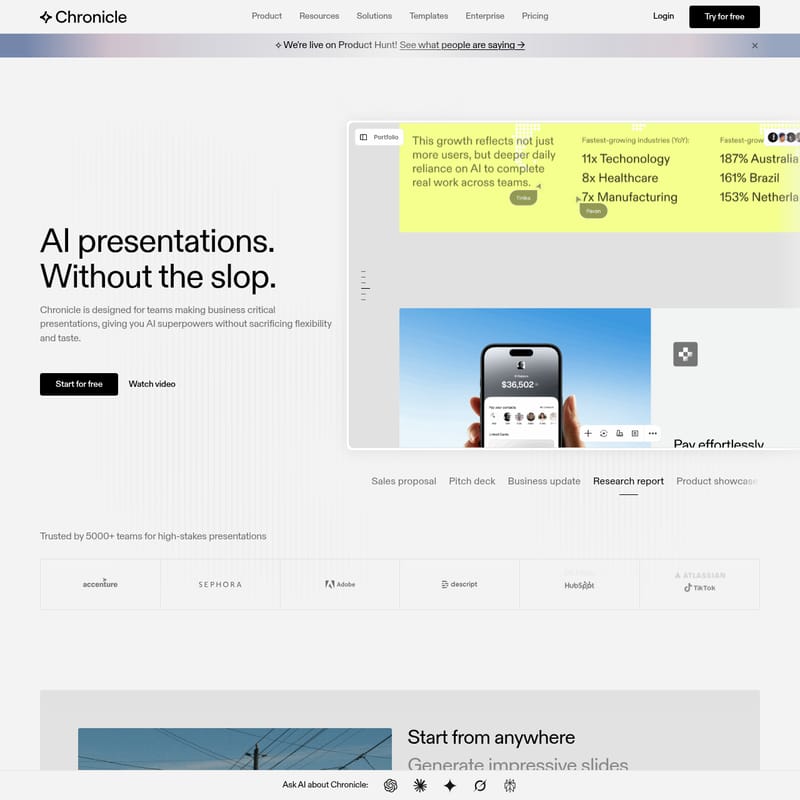
Chronicle is an advanced AI presentation maker designed for teams creating business-critical decks. Built by veterans from McKinsey, BCG, and Apple, it offers AI superpowers without sacrificing design flexibility or visual taste. Unlike traditional slide tools, Chronicle allows users to generate impressive, on-brand slides from raw notes, outlines, or existing documents. It features a freeform canvas for full customizability, enterprise-grade security, and seamless export to PPT and PDF. Trusted by over 5000 teams, Chronicle ensures every presentation is polished, professional, and consistent with brand guidelines.
2026-03-12
152.0K
Chronicle 2.0 Product Information
Chronicle: The AI Presentation Maker for Business-Critical Decks
In the modern corporate landscape, your reputation is often reflected in the quality of your slides. Chronicle is an innovative AI presentation maker specifically designed for teams that need to create high-stakes, business-critical presentations. Unlike standard AI generators that produce generic results, Chronicle combines AI superpowers with the visual taste and flexibility required by professionals. Built by a team with experience at McKinsey, BCG, and Apple, Chronicle ensures that your slides are professional, polished, and free from the "slop" often associated with automated tools.
What’s Chronicle?
Chronicle is a comprehensive presentation platform that leverages artificial intelligence to transform raw ideas into professional-grade decks. It is more than just a template gallery; it is a sophisticated design partner that understands business context. Chronicle is built on a freeform canvas, giving users the freedom to edit and refine slides without the constraints of rigid layouts. Whether you are building a sales proposal, a pitch deck, or a research report, Chronicle provides the tools to generate impressive visuals while maintaining full control over your brand identity.
Key Features of Chronicle
Chronicle stands out in the market of AI presentation tools by offering a suite of features tailored for serious business use cases.
AI-Powered Slide Generation
With Chronicle, you can start from anywhere. Paste your raw notes, outlines, meeting documents, or even existing decks into the platform. The AI then pulls everything into a single, cohesive presentation. It goes from raw ideas to polished slides in a single click, creating stellar visuals and professional diagrams.
Full Customizability with a Freeform Canvas
Unlike other AI generators that limit your editing capabilities, Chronicle provides a freeform canvas. You can instruct the AI to refine and iterate on specific elements, giving you total control over layouts and visuals without breaking your established brand rules.
Brand Consistency and Guidelines
Chronicle allows you to bring your brand guidelines into the platform with one click. You can set up custom fonts, colors, and visual rules to ensure that every slide generated by Chronicle is consistent across your entire organization.
Data Visualization and Integrations
Visualizing data is seamless within Chronicle. You can create charts, graphs, metrics, and tables easily. Furthermore, you can embed hundreds of different tools directly into your Chronicle presentation to keep your data live and interactive.
Export and Sharing Options
Chronicle offers versatile sharing capabilities. You can present directly from the platform to guide audience attention, export your work to PowerPoint (PPT) for further editing, save as a PDF, or even publish your deck as a functional website.
Professional Templates
Access hundreds of templates designed by world-class storytellers from firms like Apple, McKinsey, BCG, and IDEO. These templates help you jumpstart the creation of tailored proposals and updates.
Enterprise-Grade Security and Collaboration
Chronicle is built for professional teams. It includes real-time collaboration features, template sharing, and permission management. Your content is protected by enterprise-grade security, ensuring your business data remains private.
Use Cases for Chronicle
Chronicle is a versatile tool that adapts to various professional requirements:
- Sales Teams: Use Chronicle to create tailored sales proposals, pitch decks, and pipeline updates that impress potential clients.
- Executive Leadership: Generate business updates and project plans that clearly communicate strategy and metrics.
- Research and Analysis: Transform complex research reports into digestible, visually engaging presentations.
- Product Managers: Build product showcases that highlight features and workflows effectively.
- Startups: Craft high-quality pitch decks that stand out to investors through superior design and storytelling.
How to Use Chronicle
Using Chronicle is designed to be intuitive and efficient, moving you from concept to completion in minutes.
- Input Your Content: Start by importing your raw data. This can be anything from a rough outline to a detailed meeting transcript or an old slide deck.
- Generate Slides: Click to let the AI process your information. Chronicle will automatically organize the content into a logical flow with professional layouts.
- Edit with AI: Use natural language instructions to tell Chronicle how to refine the slides. You can change the tone, swap visuals, or reorganize elements on the freeform canvas.
- Apply Branding: Ensure the presentation matches your corporate identity by applying your pre-set brand fonts and colors.
- Collaborate and Finalize: Invite team members to review the deck in real-time. Use the built-in charts and integrations to add the finishing touches.
- Share or Export: Choose your preferred format. Export to PPT if you need to continue offline, or publish as a website for a modern viewing experience.
FAQ
Is Chronicle better than Google Slides or Gamma? Many users prefer Chronicle because of its lack of cluttered UI and its superior design quality. Users have noted that Chronicle produces layouts and designs that are "miles ahead" of other AI tools like Gamma, specifically for professional business contexts.
Can I export my Chronicle presentations to PowerPoint? Yes, Chronicle allows you to export your presentations directly to PPT, where you can continue editing as needed.
Is my data secure on Chronicle? Absolutely. Chronicle is designed for professional teams and includes enterprise-grade security to keep your private content protected.
Who designed the templates in Chronicle? The templates in Chronicle are crafted by world-class designers and storytellers with experience at top-tier firms such as Apple, McKinsey, and BCG.
Can I use my own brand assets? Yes, Chronicle makes it easy to upload and set your brand fonts, colors, and visual rules to maintain consistency across all slides.