Backgrind
Backgrind: The Always-On-Top Overlay for AI Coding Agents and Seamless Multi-Tasking
Backgrind is a powerful desktop overlay for macOS and Windows designed to host AI coding agents like Claude Code, Cursor, and the native Grindy model in an always-on-top window. It allows developers to 'vibe code' or manage complex repos while gaming or browsing, featuring click-through transparency, real-time notifications, and mobile remote control via Live Mode.
2026-06-24
--K
Backgrind Product Information
Backgrind: The Ultimate Always-On-Top Overlay for AI Coding Agents
In the modern era of software development, efficiency is defined by how well a developer can collaborate with artificial intelligence. Backgrind is the premier desktop solution designed specifically for vibe coders and professional developers who want to integrate AI agents seamlessly into their workflow. By providing a thin, always-on-top frontend over the command-line interfaces (CLI) you already use, Backgrind ensures that your AI coding agent is always accessible without ever breaking your focus.
What's Backgrind?
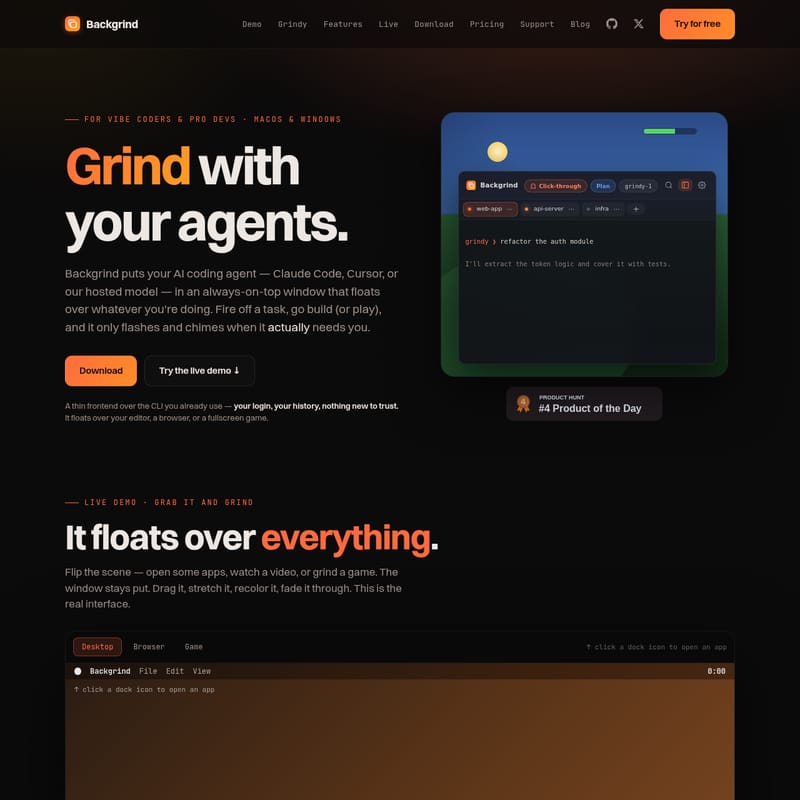
Backgrind is a specialized desktop application for macOS and Windows that puts your AI coding agent—whether it’s Claude Code, Cursor, or the native Grindy model—into a floating window that stays on top of your active applications. It is designed to act as a lightweight overlay that allows you to trigger tasks and monitor progress while you work in your primary IDE, browse documentation, or even play games in borderless fullscreen mode.
Backgrind serves as a bridge between high-level task management and low-level CLI execution. It doesn't replace your existing tools; instead, it wraps them in a highly accessible interface that flashes and chimes only when the agent requires human intervention. This makes Backgrind the perfect companion for anyone looking to maximize their productivity through the power of AI agents.
Key Features of Backgrind
Always-On-Top Floating Interface
The core of the Backgrind experience is its persistent window. Whether you are using a browser, a video player, or a game, the Backgrind window stays put. You can drag it, stretch it, recolor it, or adjust its opacity to fit your aesthetic and functional needs.
Multi-Agent Support and "Bring Your Own Agent"
Backgrind offers total flexibility with no vendor lock-in. You can choose the backend that best suits your current project:
- Claude Code: Use your existing Claude CLI with the same login and history.
- Cursor: Integrate the Cursor-agent CLI directly into the overlay.
- Grindy: Backgrind’s hosted model that requires zero installation or API keys.
- Codex: (Coming Soon) Support for the Codex CLI.
Glance Mode and Click-Through Functionality
Using hotkeys like ⌘⇧A to show/hide or ⌃⌘S for a quick glance, users can toggle the Backgrind window. In Glance Mode, the window becomes transparent, allowing clicks and keystrokes to pass through to the applications underneath. This is ideal for developers who need to keep an eye on their agent’s progress without obstructing their primary workspace.
Grindy: The No-Config Hosted Model
For those who want to start immediately, Grindy is the built-in agent. It requires no Homebrew, no npm, and no PATH surgery.
- Metered Billing: Pay only for the tokens you use, metered to the cent.
- Massive Context: Features up to a 1M-token context window to handle large codebases.
- Build vs. Plan: Switch modes depending on whether you want the agent to think through a problem or start shipping code immediately.
Live Mode for Remote Management
With Live Mode, you can step away from your desk while your agents continue to work. This feature mirrors your Backgrind desktop to a phone or tablet via an end-to-end encrypted link. You can watch the terminal stream, type commands, and approve actions from anywhere.
Vibe Code Mode
Backgrind caters to "vibe coding," a philosophy where you describe what you want rather than reading every line of code.
- Hands-off: Auto-accepts edits for non-sensitive files.
- Simplified View: Hides the file tree and terminal to focus on results.
- Level Tuning: Set your level (Basic, Medium, or Pro) to determine how much the agent explains versus how much it quietly handles.
How to Use Backgrind
Getting started with Backgrind is straightforward, whether you are a seasoned pro or a new developer:
- Installation: Download the signed release for macOS (11 Big Sur or later) or Windows (10/11 64-bit).
- Choose Your Agent:
- To use Claude Code or Cursor, simply log in as you would in your terminal. Backgrind wraps your existing CLI hooks.
- To use Grindy, sign in through the app. There are no API keys to generate or config files to edit.
- Initiate a Task: Open a folder/workspace and describe the feature or refactor you need. For example:
grindy ❯ refactor the auth module. - Monitor Progress: Use the always-on-top window to watch the agent read files, run tests, and request approvals.
- Remote Control: If you need to leave your desk, scan the QR code to pair your mobile device via Live Mode to keep the grind going.
Use Case Scenarios
- The Multitasking Developer: Run a refactoring task in the Backgrind overlay while you are in a meeting or watching a technical tutorial. The app will chime only when it needs a "yes/no" approval to commit code.
- The Vibe Coder: Use the Basic coding level to describe a website idea in plain English. Watch as Grindy handles the boilerplate and file creation while keeping the intimidating terminal views hidden.
- The Pro Gamer: Launch a game in borderless fullscreen. Keep Backgrind in a corner to monitor long-running test suites or deployments. If a build fails, you'll know instantly without alt-tabbing.
- The Multi-Repo Manager: Use the Pro plan to run unlimited parallel agents across different workspaces, each pinned to its own folder, similar to a multi-root setup in VS Code.
Privacy and Trust
Backgrind is built with a privacy-first mindset. It acts as a thin client that renders your CLI locally.
- Local Execution: Your conversation history is never stored or transmitted by the overlay.
- Secrets Protection: Use a
.grindignorefile to ensure sensitive data like.envfiles and private keys never leave your machine. - No Injection: Backgrind does not read game memory or use anti-cheat hooks, making it safe to use alongside other software.
- Encryption: Live Mode pairing is desktop-initiated with a per-pairing key, ensuring your code remains yours.
FAQ
Q: Which operating systems are supported? A: Backgrind currently supports macOS 11 (Big Sur) or later (Apple Silicon & Intel) and Windows 10 & 11 (64-bit). Linux support is coming soon.
Q: Do I need a subscription to use Backgrind? A: There is a Free tier that includes the always-on-top overlay and support for bringing your own CLI (Claude/Cursor). Paid plans (Plus and Pro) offer advanced features like parallel agents, Live Mode, and hosted Grindy models.
Q: Does it really run over a fullscreen game? A: Yes, it is designed to float over borderless-fullscreen applications, allowing you to monitor your code while gaming or watching videos.
Q: Is my code used for training? A: No. In "bring-your-own-CLI" mode, your content stays between you and your provider. Backgrind does not collect or train on your code.
Q: What is the difference between Build and Plan modes? A: Build mode instructs the agent to ship code immediately, while Plan mode encourages the agent to think and outline steps before making changes.