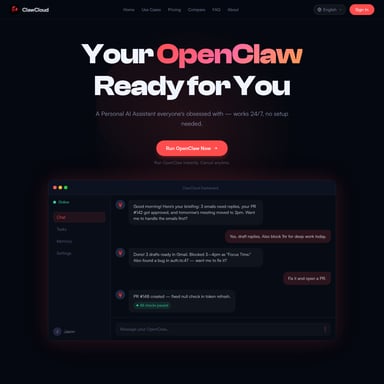
Atomic Bot
Atomic Bot: The Ultimate User-Friendly Interface for Open-Source OpenClaw AI Personal Assistants
Atomic Bot is a powerful, privacy-first native application designed to bring the full capabilities of OpenClaw (Clawdbot) to your desktop. Available for macOS and Web with Windows and iOS support coming soon, Atomic Bot transforms complex AI workflows into a seamless, one-click experience. It functions as a 24/7 digital coworker capable of managing Gmail, automating calendars, organizing files, and controlling your browser to complete routine tasks. Whether run locally for maximum privacy or in the encrypted cloud for cross-device access, Atomic Bot offers persistent memory and integration with over 100 apps. It replaces manual terminal configurations with a guided setup, making advanced autonomous AI agents accessible to everyone from developers to casual users.
2026-03-11
46.0K

Atomic Bot Product Information
Atomic Bot: Your All-in-One Personal AI Assistant Powered by OpenClaw
In the rapidly evolving landscape of artificial intelligence, Atomic Bot emerges as the premier solution for users seeking a powerful, autonomous personal assistant. By providing a user-friendly native interface for the renowned OpenClaw (formerly Clawdbot) engine, Atomic Bot bridges the gap between complex open-source technology and everyday productivity.
With over 210,000 stars on GitHub, the foundation of Atomic Bot is built on proven, community-driven excellence. Whether you are looking to automate your professional workflow or organize your personal life, Atomic Bot offers a private, local, and open-source platform to get things done.
What's Atomic Bot?
Atomic Bot is a native application—available now for macOS and Web—that serves as a human-friendly gateway to OpenClaw. While the original OpenClaw requires terminal commands and manual service configuration, Atomic Bot simplifies the entire process into a guided, one-click installation.
It is designed to be more than just a chatbot; it is a personal agent that actually works across your daily tools. Atomic Bot can "see" and "act" on your digital workspace, effectively behaving like a coworker sitting at a desk with a keyboard and mouse. It is built for people who want the power of an autonomous assistant without the technical hurdles of a CLI-based interface.
Key Features of Atomic Bot
Atomic Bot is packed with features that turn a standard AI model into a highly efficient digital agent:
- Simple One-Click Installer: Unlike traditional setups, Atomic Bot guides you through every step. No terminal knowledge is required to get your assistant live 24/7.
- Persistent Memory: The assistant remembers your preferences, ongoing tasks, and specific details. The more you interact with Atomic Bot, the better it understands your unique workflow.
- Local or Cloud Execution: You have the freedom to run Atomic Bot locally on your device for maximum privacy or use an encrypted cloud setup for access from any device.
- Browser Control: Atomic Bot can take over web tasks—opening websites, clicking through flows, filling out forms, and collecting data directly from your chat interface.
- Multiple AI Model Support: Flexibility is at the core of Atomic Bot. You can choose and switch between different AI engines, including Claude, GPT, Gemini, and more.
- Scheduled Tasks: Your assistant can message you first, run recurring tasks, and monitor specific data points so you always stay ahead of your schedule.
- Open Source Transparency: The macOS app is fully open-source, ensuring security and community-led improvements.
Comprehensive Use Cases
How can Atomic Bot change your daily routine? Here are several ways users are currently leveraging the power of this assistant:
1. Gmail & Communication Management
Atomic Bot can clear threads, draft replies in your specific tone, and send follow-ups. It acts as a dedicated inbox manager to ensure you never miss an important message.
2. Calendar Autopilot
Scheduling meetings, moving events, and setting reminders becomes effortless. Atomic Bot handles the logistics of your Google Calendar in seconds.
3. Document Analysis
Stop spending hours reading long PDFs or Docs. Atomic Bot can summarize documents, extract action items, and highlight key takeaways for you.
4. File and System Organization
Atomic Bot can find, rename, and sort your downloads. It helps you build a "second brain" by keeping your files organized and easily retrievable.
5. Research and Monitoring
Use Atomic Bot to track trends, monitor competitors, or follow specific keywords on X (Twitter). It can generate daily digests so you stay informed without manual searching.
6. Developer Assistance
Integrating with GitHub, Atomic Bot can read Pull Requests, summarize code changes, and even draft release notes, making it a favorite for software engineers.
How to Use Atomic Bot
Getting started with Atomic Bot is designed to be fast and intuitive, whether you prefer a local setup or the cloud.
Local Setup (macOS & Windows)
- Download & Install: Grab the installer for your operating system.
- Connect Skills: Use the guided interface to link your favorite apps like Gmail, Slack, or GitHub.
- Meet Your Coworker: Start chatting and assigning tasks to your 24/7 assistant.
Cloud Setup
- Sign In: Use one-click Google sign-in to access the cloud version.
- Configure Services: Connect your API keys or services (Atomic Bot offers an optional paid plan if you prefer to skip manual API setup).
- Run Anywhere: Access your assistant's power from any device with an internet connection.
Atomic Bot vs. OpenClaw
| Feature | Atomic Bot | OpenClaw (Manual) | | :--- | :--- | :--- | | Setup | One-click / Guided | Terminal / Manual | | Interface | User-friendly Native App | CLI-based | | Skills | Pre-installed / Marketplace | Manual download | | Sign-in | Google One-Click | Complicated config |
FAQ
What is Atomic Bot? Atomic Bot is a native app that brings OpenClaw capabilities to everyday users through a simple, high-design interface.
Is Atomic Bot the same as OpenClaw/Clawdbot? Yes, it delivers the same full power and capabilities but through a much simpler management interface.
Is Atomic Bot free? Atomic Bot is free to use. There is an optional paid plan for users who want to avoid manual API key configuration.
What's the difference between Atomic Bot and ChatGPT? While ChatGPT answers questions in a chat, Atomic Bot executes tasks across your tools (email, browser, files) to actually get work done.
Is Atomic Bot secure? Absolutely. It is privacy-first by design. You choose where your data lives—either entirely on your local device or encrypted in the cloud.
Which platforms are supported? Currently, Web and macOS apps are available. Windows, iOS, and Android versions are coming soon.