Amara
Meshgen Amara: AI-Powered UE5 Plugin for 3D Mesh Generation and Scene Layout
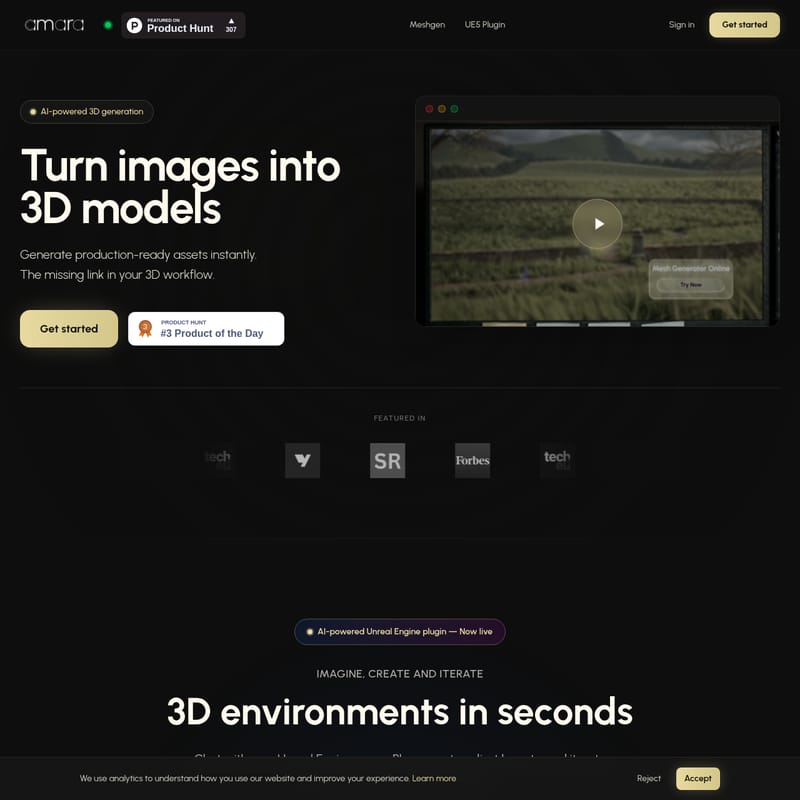
Meshgen Amara is a revolutionary AI-powered Unreal Engine 5 plugin designed to transform 2D images into production-ready 3D models and automate scene layouts using natural language. With features like the Amara Assistant and real-time mesh generation, it streamlines the 3D workflow for developers and artists.
2026-02-04
--K
Amara Product Information
Meshgen Amara: The Ultimate AI-Powered UE5 Plugin for 3D Generation
In the rapidly evolving landscape of game development and digital design, the bridge between concept and creation has often been a bottleneck. Meshgen Amara emerges as the missing link in your 3D workflow, providing a high-performance UE5 Plugin designed to accelerate production. By leveraging AI-powered 3D generation, Meshgen allows developers to turn images into 3D models and build entire environments using simple text commands.
What's Meshgen Amara?
Meshgen Amara is an advanced AI-powered Unreal Engine plugin that streamlines the creation of production-ready assets and complex scene layouts. It is a comprehensive toolset that integrates directly into Unreal Engine, allowing users to generate 3D meshes from 2D images and manipulate their environment through the Amara Assistant.
Whether you are a solo developer or part of a large studio, Meshgen offers a way to generate production-ready assets instantly, ensuring that your creative momentum is never interrupted by manual modeling or tedious asset placement. It represents the future of scene generation, where creativity is powered by innovation and natural language processing.
Key Features of Meshgen Amara
AI-Powered 3D Generation
At the core of the plugin is the ability to perform AI-powered 3D generation. This feature allows users to convert standard 2D images into high-quality, production-ready meshes. If you find yourself missing specific assets in your Unreal Engine library, Meshgen fills the gap instantly.
The Amara Assistant
The Amara Assistant acts as your personal co-pilot within Unreal Engine. It enables a "chat with your scene" experience, where you can use natural language to control the world around you.
Natural Language Control
By using commands like "Place a modern sofa facing the window," you can build entire scenes without manual dragging and dropping. This natural language control makes scene building as simple as having a conversation.
Context-Aware Intelligence
Unlike standard placement tools, Meshgen is context aware. It understands the composition of your existing scene and intelligently places assets where they logically belong, respecting the spatial hierarchy of your project.
Rapid Layout and Iteration
Speed is essential in modern development. Meshgen facilitates rapid layout, allowing you to populate complex scenes in seconds. Once assets are placed, you can refine with natural language, describing changes to geometry or textures until the result is perfect.
Production-Ready Assets
Every model generated by the mesh generator is designed to be production-ready. This means the meshes are optimized for use within the Unreal Engine environment, supporting high-quality rendering and performance.
Use Case Scenarios
1. Rapid Prototyping and Environment Design
Architectural visualizers and level designers can use Meshgen to create 3D environments in seconds. By describing the desired layout, designers can iterate on multiple concepts in a fraction of the time it would take to place objects manually.
2. Asset Library Expansion
When a project requires a specific prop that isn't in the current library, developers can use the 2D to 3D instant conversion feature. Simply provide an image of the required object, and Meshgen will generate the 3D mesh ready for placement.
3. Real-Time Scene Iteration
During the polish phase of a project, the Amara Assistant can be used to make granular adjustments. A designer can tell the AI to "adjust layouts" or "iterate on designs," making the fine-tuning process collaborative and efficient.
How to Use Meshgen Amara
To begin optimizing your workflow with Meshgen, follow these general steps based on the integrated plugin functionality:
- Install the UE5 Plugin: Ensure you have the latest v1.1.0 Public Beta installed in your Unreal Engine environment.
- Access Amara Assistant: Open the assistant within your scene to begin the natural language interface.
- Generate Meshes: Use the Try mesh generator option to upload or reference a 2D image. The AI will process this into a 3D model.
- Issue Commands: Type natural language commands to place your new assets. For example: "Place the generated asset in the center of the room."
- Refine: Describe any necessary changes to the texture or geometry through the chat interface to finalize your asset.
FAQ
What version of Unreal Engine is supported?
Meshgen is currently available as a UE5 Plugin, specifically optimized for the latest versions of Unreal Engine.
Can I turn any image into a 3D model?
Yes, the AI-powered 3D generation tool is designed to turn 2D images into production-ready meshes instantly.
Is Meshgen Amara free to try?
Users can get started free to experience the AI-powered scene generation and 3D mesh creation capabilities.
What makes the Amara Assistant "context aware"?
The assistant analyzes your current Unreal Engine scene's composition. This allows it to understand where objects should be placed relative to windows, walls, and other assets already present in the environment.
How do I iterate on a generated model?
You can refine with natural language. Simply describe the changes you want to see regarding the geometry or texture, and the AI will update the model accordingly.
Experience the future of 3D workflow. Meshgen Amara is the tool designed to help you imagine, create, and iterate without the traditional barriers of 3D modeling.