
Agentation
Agentation: Turn UI Annotations into Structured Context for AI Coding Agents
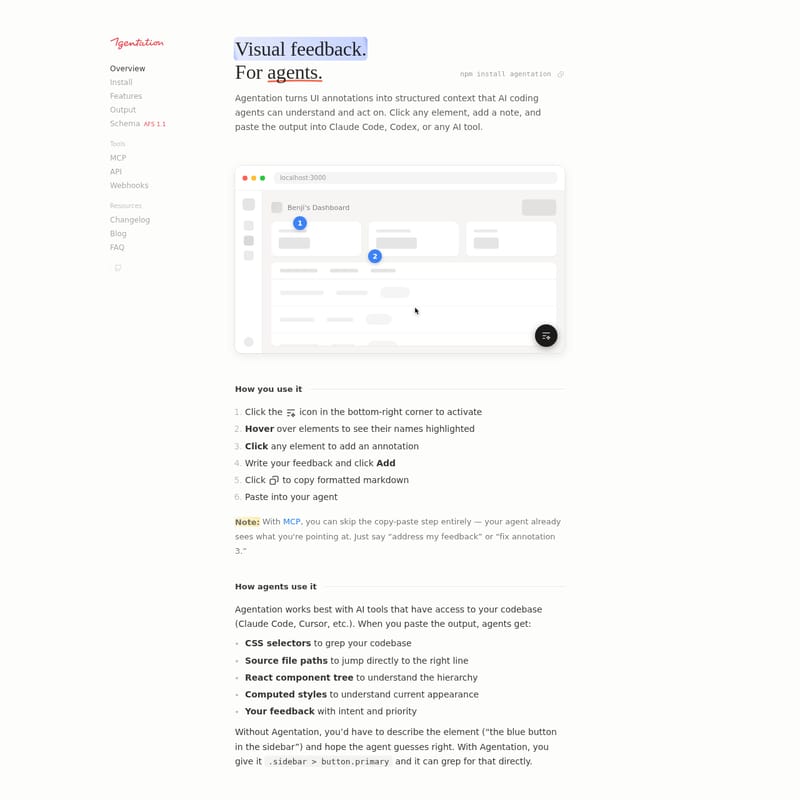
Agentation is a powerful developer tool designed to bridge the gap between visual UI feedback and AI coding agents. By converting UI annotations into structured markdown or automated MCP data, it allows developers to provide precise instructions to agents like Claude Code or Cursor. It captures CSS selectors, React component trees, and computed styles to ensure AI tools can pinpoint exact code locations without guesswork. With features like animation pausing, MCP integration for real-time sync, and detailed schema outputs, Agentation streamlines the debugging and development workflow for teams and individuals.
2026-03-29
38.0K
Agentation Product Information
Agentation: The Definitive Guide to AI-Powered UI Annotations
In the evolving landscape of AI-assisted development, precision is the most valuable currency. Agentation is a specialized tool designed to bridge the communication gap between human developers and AI coding agents. By turning visual UI annotations into structured context, Agentation ensures that agents like Claude Code, Cursor, and Codex understand exactly what needs to be fixed, styled, or refactored.
What's Agentation?
Agentation is a developer productivity tool that converts manual UI feedback into machine-readable data. Instead of wasting time describing an element's location (e.g., "that blue button in the sidebar"), Agentation allows you to click the element and generate a precise output containing CSS selectors, source file paths, and component hierarchies.
Whether you are using the manual copy-paste method or the automated MCP (Model Context Protocol) integration, Agentation provides the necessary metadata for an AI agent to "see" your application through your eyes. It is currently at version v3.0.2 and was developed by Benji Taylor, Dennis Jin, and Alex Vanderzon.
Features of Agentation
Agentation is packed with features designed to optimize the feedback loop between developers and AI agents:
- Visual Feedback: Get immediate visual cues when interacting with elements to ensure you are selecting the correct UI component.
- Structured Output: Generates formatted markdown that includes CSS selectors, React component trees, and computed styles.
- MCP (Model Context Protocol) Integration: Skip the copy-paste process. MCP allows your agent to see what you are pointing at in real-time.
- Animation Pause: Use the "freeze" icon in the toolbar to stop animations, making it easier to annotate a specific frame or state.
- Element Highlighting: Hover over any element to see its name and path highlighted before you commit to an annotation.
- Webhooks & API: Push annotation data to external services or build custom integrations using the provided API.
- Schema Support: Utilizes the AFS 1.1 (Annotation Format Schema) to ensure data consistency across different AI tools.
- Customizable Markers: Change marker colors and manage how annotations are cleared (e.g., clear on copy or hide until restart).
How to Use Agentation
Getting started with Agentation is straightforward, whether you are a solo developer or working within a large team. Follow these steps to integrate it into your workflow:
Installation
To add Agentation to your project, use the following npm command:
npm install agentation
Step-by-Step Guide
- Activate the Toolbar: Click the icon located in the bottom-right corner of your browser to activate the Agentation interface.
- Highlight Elements: Hover your mouse over UI elements to see their names and boundaries highlighted.
- Create an Annotation: Click any element to open the annotation dialog.
- Add Feedback: Write your specific feedback or instructions and click Add.
- Export for Agents: Click the copy icon to grab the formatted markdown, or if using MCP, simply tell your agent to "address my feedback."
- Paste and Execute: Paste the output into your preferred AI tool (Claude Code, Cursor, etc.).
How Agents Use Agentation Data
When you provide an AI agent with Agentation data, it receives more than just a comment. It gains access to:
- CSS Selectors: Enables the agent to
grepyour codebase for specific classes like.sidebar > button.submit-btn. - Source File Paths: Directs the agent to the exact line in the source code.
- React Component Tree: Helps the agent understand the parent-child relationships in your UI.
- Computed Styles: Provides the current appearance (padding, colors, fonts) so the agent can make accurate visual adjustments.
Use Case Scenarios
1. UI Debugging and Refactoring
Instead of hunting through a large React project to find where a specific button is defined, a developer can click the button using Agentation and tell the agent: "Change the padding of this button to match the design spec." The agent uses the provided CSS selector to find the code instantly.
2. Team Design Reviews
Teams can use Agentation to annotate a staging environment. Because Agentation is free for internal use, members can leave notes on specific UI states, which are then passed to an AI agent to resolve as a batch.
3. Interactive Feedback with MCP
With MCP integration, the feedback becomes a two-way conversation. An agent can ask, "Should this be 24px or 16px?" or confirm a fix by saying, "Fixed the padding." This transforms annotations from static notes into an active development dialogue.
Best Practices for Better Results
To get the most out of your Agentation experience, follow these recommendations:
- Be Specific: Use "Button text unclear" instead of "fix this."
- One Issue Per Annotation: This makes it easier for the AI agent to address and resolve items individually.
- Include Context: Mention what you expected to see versus what is actually appearing.
- Use Text Selection: For typos or content issues, highlight the specific text to create a more targeted annotation.
FAQ
Q: Is Agentation free to use? A: Yes, Agentation is free for individuals and companies for internal use. If you wish to redistribute it as part of a product you sell, a commercial license is required.
Q: Which AI tools are compatible? A: Agentation works best with tools that have codebase access, such as Claude Code, Cursor, and Codex.
Q: What is the benefit of the MCP connection? A: The MCP connection allows for real-time sync. You can skip the copy-paste step entirely because the agent is already aware of your annotations.
Q: Can I use it for animations? A: Absolutely. The toolbar includes a pause feature that allows you to freeze an animation at a specific frame for accurate annotation.
Pro Tip: Setting up Webhooks allows you to receive live annotation changes and data directly in your external services for better project management.







