Agent Builder by Thesys
Agent Builder by Thesys: A No-Code Generative UI Platform for Interactive AI Agents
Agent Builder by Thesys is a revolutionary no-code platform designed to create and publish AI agents that move beyond text-only responses. By leveraging Generative UI, these agents respond with interactive charts, forms, cards, and tables. Users can connect data sources, customize brand styles, and embed live links or snippets into websites in minutes. Trusted by developers from AI-native teams, Agent Builder simplifies the path from data to live agent without complex workflows or engineering requirements, offering a dynamic, brand-aligned experience for internal tools and customer-facing apps.
2026-02-12
123.0K
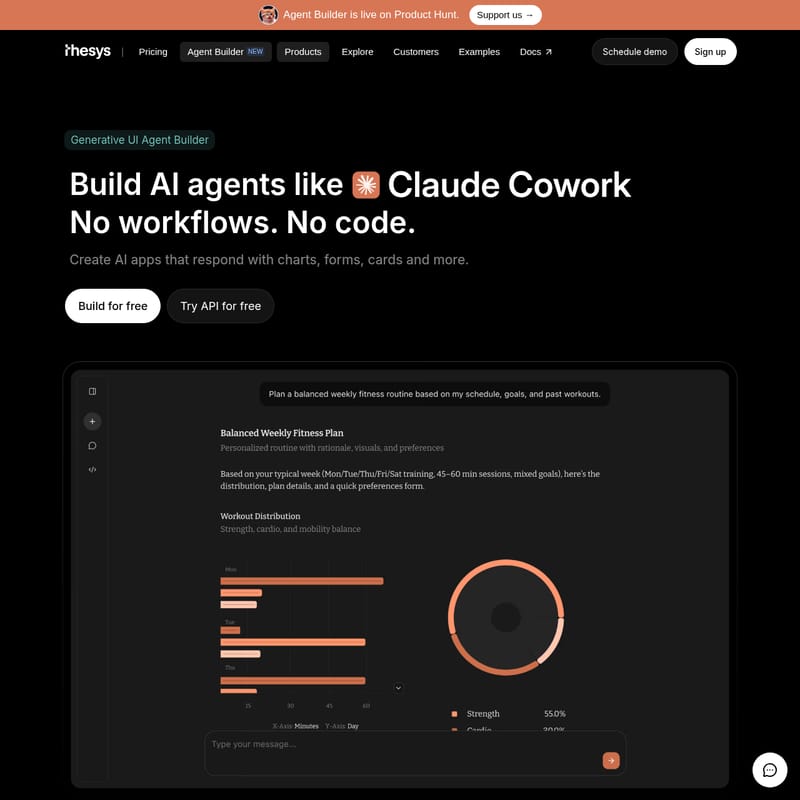
Agent Builder by Thesys Product Information
Agent Builder: Transform Your Data into Interactive AI Apps with Generative UI
In the evolving landscape of artificial intelligence, the Agent Builder by Thesys stands out as a pioneering platform that redefines how users interact with AI. Moving beyond the limitations of "text-in, text-out" interfaces, the Agent Builder enables the creation of AI agents that respond with dynamic, interactive elements like charts, forms, and cards. Now live on Product Hunt, this tool allows you to go from an idea to a live agent in minutes, requiring absolutely no code or complex workflows.
What's Agent Builder?
Agent Builder is a comprehensive no-code platform developed by Thesys for creating and publishing sophisticated AI applications. Unlike traditional chatbots that provide long-form text responses, the Agent Builder generates rich interfaces that users can actually act on. It is powered by the C1 engine, which facilitates the generation of high-quality components such as tables, reports, and interactive UI elements.
At its core, Agent Builder is designed to be truly agentic. Instead of following rigid pre-defined workflows, these agents use natural language instructions to define intent and boundaries, allowing them to decide the path dynamically. This makes it an ideal solution for businesses looking to build internal tools, customer-facing copilots, or standalone AI applications that feel native to their brand.
Features of Agent Builder
Generative UI Components
The standout feature of the Agent Builder is its ability to create Generative UI. Instead of reading through a wall of text, your users see:
- Interactive Charts: Visualize data from Google Sheets or databases instantly.
- Custom Cards and Forms: Capture user information or display product details elegantly.
- Comparison Tables: Help users make decisions with structured data views.
- AI Slides and Reports: Turn conversations into stunning visual presentations and reports in seconds.
Truly Agentic Logic
Forget about mapping out every possible user path. With Agent Builder, you simply define the boundaries and the agent manages the conversation flow dynamically based on user intent.
Seamless Data Integration
The Agent Builder works with all your existing data sources. You can:
- Upload files and link content.
- Drop URLs or connect to Model Context Protocols (MCPs).
- Link databases and tools without any extra engineering setup.
Brand Customization
Every agent built can be styled to look like your brand. You have full control over colors, themes, and styles, ensuring the Agent Builder output feels like a native part of your existing product ecosystem.
Flexible Deployment
You can share your creation via a live link or embed it directly into your website using a simple code snippet. It works seamlessly as a website copilot or a conversational AI guide.
Use Case Scenarios
The versatility of the Agent Builder allows for a wide range of applications across different industries:
- Data Analysis: Generate charts from Google Sheets or convert Google Docs into professional slides automatically.
- Customer Support: Answer user questions on your website with a copilot that provides interactive UI instead of just text.
- Knowledge Management: Turn complex documentation into a conversational AI guide that helps users find information visually.
- Reporting: Analyze files and show insights visually, or generate visual summaries from Google Drive folders.
- Internal Tools: Create reports and forms that streamline internal business processes without writing a single line of code.
How to Use Agent Builder
Creating a powerful AI experience with the Agent Builder is a simple three-step process:
- Upload Data and Connect MCPs: Start by uploading your files, linking specific content, or connecting your tools and databases to provide the agent with the necessary context.
- Customize Your Agent: Use natural language to set the tone and add specific instructions. Choose your conversation starters and style the interface to match your brand identity.
- Share or Embed: Once satisfied, you can share a live link or paste a provided snippet into your website code to go live instantly.
"The component generation is top-notch, fast, clean, and incredibly intuitive." — Jeel Patel, CEO, Fieldcamp
FAQ
What is Agent Builder by Thesys?
Agent Builder is a no-code platform for creating and publishing AI apps that respond with charts, cards, tables, and forms. It allows you to connect data and publish a live website copilot or standalone app in minutes.
Who is this Agent Builder for?
It is for anyone—from startups and SaaS products to online stores—who wants to create an AI app using their own data and share it as an interactive experience.
Do I need to write any code?
No. You can build, customize, and publish your agent entirely through the Thesys interface. While an optional C1 API is available for developers who want more control, no coding is required to use the Agent Builder.
How do I create a copilot for my website?
Simply go to thesys.dev/agent-builder, connect your data source (URL or file), click publish, and copy the embed snippet into your site. Your copilot goes live instantly.
How is this different from a normal chatbot?
Normal chatbots return text, which can lead to "dead ends." Agent Builder agents return interactive UI, allowing users to take immediate action through charts, tables, and forms.
How does pricing work?
Thesys utilizes usage-based pricing. You only pay for what your agents generate (charts, cards, etc.). You can start for free and add credits as your usage increases.