
Cursor 3 Launch: Introducing a Unified Workspace for Autonomous AI Agent Software Development
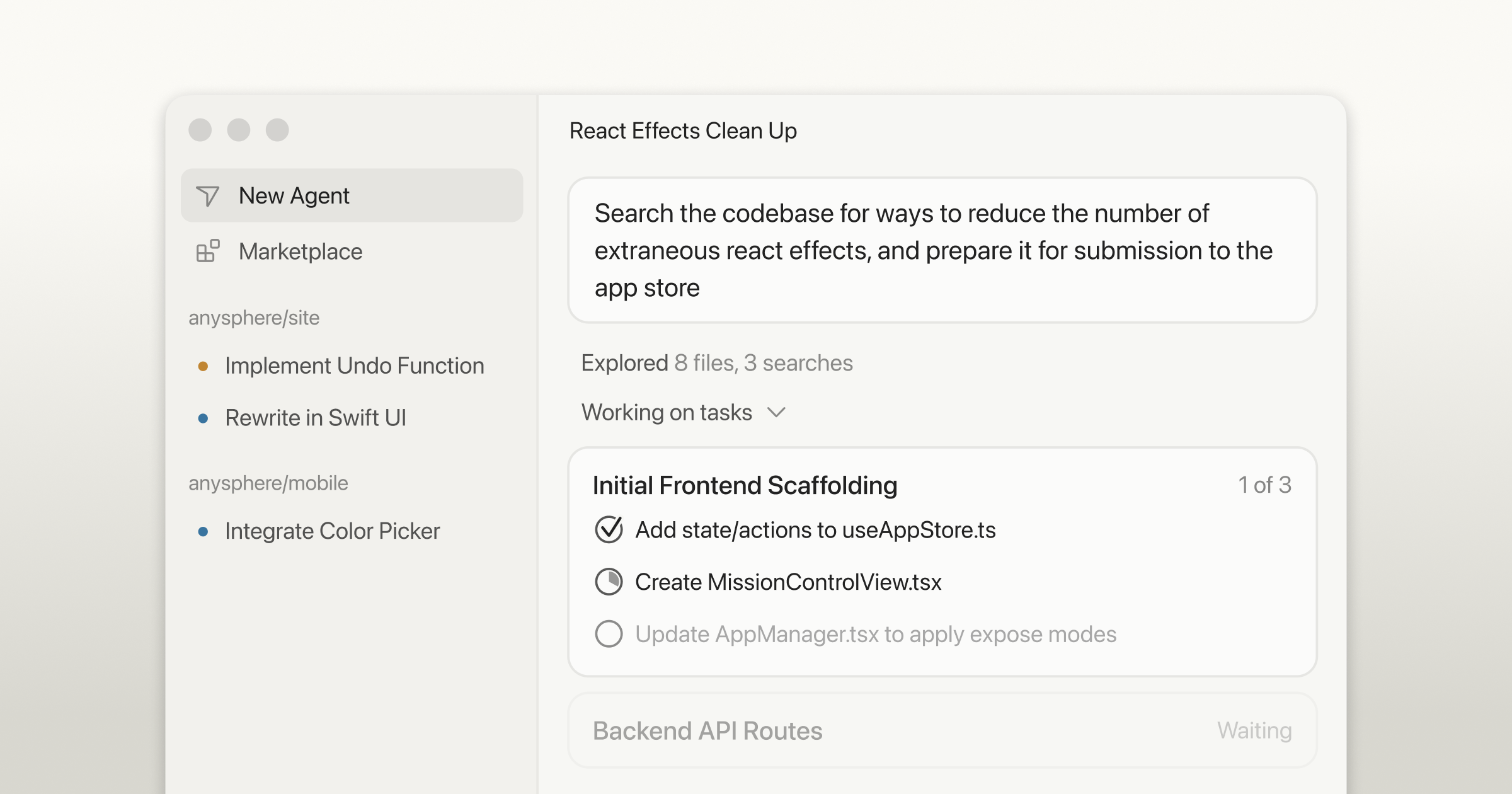
Cursor has announced the launch of Cursor 3, a significant evolution in its software development platform designed for the era of autonomous AI agents. Moving beyond manual file editing, Cursor 3 introduces a unified workspace that allows engineers to manage fleets of agents across multiple repositories. The new version features a custom-built interface designed from scratch to reduce the need for micromanagement and context-switching between tools. Key updates include a multi-repo layout, parallel agent execution, and a seamless handoff system between local and cloud environments. By pulling developers to a higher level of abstraction while maintaining the ability to dive into details, Cursor 3 aims to streamline the transition from human-led coding to agent-driven software engineering.
Key Takeaways
- Unified Agent Workspace: Cursor 3 provides a centralized interface to manage multiple local and cloud agents, reducing the need to jump between terminals and tools.
- Custom-Built Interface: Moving beyond its VS Code fork origins, Cursor 3 features a new UI built from scratch specifically centered around agent workflows.
- Multi-Repo Support: The platform is now inherently multi-workspace, enabling humans and agents to work across different repositories simultaneously.
- Seamless Environment Handoff: Users can quickly move agent sessions between cloud and local environments for testing and manual edits.
- Parallel Execution: Engineers can run many agents in parallel, with integrations across mobile, web, Slack, GitHub, and Linear.
In-Depth Analysis
Transitioning to the Third Era of Software Development
Software development is undergoing a fundamental shift from manual file editing to a model where agents write the majority of the code. Cursor identifies this as the "third era of software development," characterized by fleets of agents working autonomously to ship improvements. However, the current state of engineering often involves micromanaging these agents and tracking fragmented conversations. Cursor 3 is designed to address these frictions by providing a higher level of abstraction, allowing developers to oversee agent production with greater clarity while retaining the power to intervene at a granular level when necessary.
A New Architecture for Agent-Centric Coding
While previous versions of Cursor were built as a fork of VS Code, Cursor 3 takes a more radical approach by introducing an interface built from scratch. This design choice was made to better accommodate the unique requirements of agent-led development. The new interface supports a multi-repo layout and integrates all agent activities—whether initiated from the desktop, mobile, web, or third-party platforms like Slack and GitHub—into a single sidebar. This centralization is intended to make the management of parallel agent tasks faster, cleaner, and more powerful than traditional IDE structures.
Local and Cloud Integration
One of the standout features of Cursor 3 is the improved user experience for handing off tasks between local and cloud environments. Cloud agents can now produce demos and screenshots of their progress for verification, a feature previously available on the web and now integrated into the desktop application. This allows for a flexible workflow where an agent session can be moved from the cloud to a local machine instantly when a developer needs to perform specific tests or manual code refinements on their own desktop.
Industry Impact
The release of Cursor 3 signals a shift in the AI-assisted coding market from "copilots" that suggest code to "agents" that execute complex tasks autonomously. By building a dedicated workspace that treats agents as first-class citizens rather than extensions, Cursor is setting a precedent for how development environments must evolve to handle multi-agent orchestration. This move could influence how other IDEs approach multi-repository management and cloud-to-local synchronization, potentially accelerating the industry's move toward high-abstraction software engineering where the developer's role shifts from writing syntax to managing autonomous systems.
Frequently Asked Questions
Question: Can I still use the traditional Cursor IDE features in Cursor 3?
Yes. While Cursor 3 introduces a new agent-centered interface, users have the option to switch back to the standard Cursor IDE at any time.
Question: How does Cursor 3 handle agents working across different projects?
Cursor 3 is inherently multi-workspace, which allows both human developers and AI agents to work across different repositories within the same unified interface.
Question: Where can I monitor the progress of cloud-based agents?
All local and cloud agents appear in the sidebar of the new interface. Cloud agents specifically provide demos and screenshots of their work so that developers can verify progress directly within the desktop app.

